What is PowerShell and how to use it: The ultimate tutorial
PowerShell is an object-oriented automation engine and scripting language with an interactive command-line shell that Microsoft developed to help IT professionals configure systems and automate administrative tasks.
Built on the .NET framework, PowerShell works with objects, whereas most command-line shells are based on text. PowerShell is a mature and well-proven automation tool for system administrators employed in both IT departments and external entities, such as managed service providers, because of its scripting capabilities.
PowerShell originated as a proprietary offering that was only available on Windows. Today, PowerShell is available by default on most recent Windows systems; simply type "powershell" into the Windows search bar to locate the PowerShell app. In 2016, Microsoft open sourced PowerShell and made it available on Linux and macOS.
What does PowerShell do?
Microsoft designed PowerShell to automate system tasks, such as batch processing, and to create system management tools for commonly implemented processes. The PowerShell language, similar to Perl, offers several ways to automate tasks:
- With cmdlets, which are very small .NET classes that appear as system commands.
- With scripts, which are combinations of cmdlets and associated logic.
- With executables, which are standalone tools.
- With the instantiation of standard .NET classes.
Admins can use PowerShell to handle a wide range of activities. It can extract information on OSes, such as the specific version and service pack levels. "PowerShell providers" are programs that make data contained in specialized data stores accessible at the command line. Those data stores include file system drives and Windows registries.
PowerShell also serves as the replacement for Microsoft's Command Prompt, which dates back to DOS. Microsoft, for example, made PowerShell the default command-line interface (CLI) for Windows 10 as of build 14791. PowerShell's role as a command-line shell is how most users become acquainted with the technology.
Why use PowerShell?
The most appealing reason to use any kind of CLI is the potential for precise and repeatable control over a desired action or task flow that is difficult, or even impossible, to replicate with a traditional GUI.
Consider using a GUI to perform an intricate task. It can involve clicking buttons, moving sliders, selecting files from multilayered menus and other actions. GUIs were designed to be comfortable for humans to use, but they can be time-consuming, cumbersome and error-prone -- especially when a task must be repeated hundreds or thousands of times.
In contrast, PowerShell offers a CLI with a mature and detailed scripting language that enables a user with rudimentary programming skills to craft a detailed set of specific instructions, or a script, for a desired task. The task can be just about anything, from finding a desired file to describing a desired state configuration for the system or other systems. Once the script is created, it can be saved as a file and executed with a click, enabling the same task to be repeated exactly the same way for any number of repetitions. Different scripts can also be chained together to create complex and highly detailed tasks.
These simple-sounding characteristics are absolutely essential for automation and scalability -- letting the computer do the work as much as is needed for the environment. Thus, PowerShell can help system administrators perform complex and highly repetitive tasks with a high level of automation and accuracy that a GUI simply can't replicate.
Key PowerShell features
Microsoft incorporates updates and new features with each PowerShell version, but the following is a list of the primary features and characteristics.
Discoverability. Users can discover PowerShell's features using cmdlets, such as Get-Command, which creates a list of all the commands -- including cmdlets and functions -- available on a given computer. Parameters can be used to narrow the scope of the search.
Help capabilities. Users can learn more about PowerShell principles and particular components, such as cmdlets, through the Get-Help cmdlet. The -online parameter provides access to help articles on the web if available for a particular topic.
Remote commands. Admins can perform remote operations on one or multiple computers, taking advantage of technologies such as Windows Management Instrumentation and WS-Management. The WS-Management protocol, for example, lets users run PowerShell commands and scripts on remote computers.
Pipelining. With PowerShell, commands can be linked together through the pipe operator, symbolized as |. This approach lets the output from a given command become the input for the next command in the pipeline sequence. The PowerShell pipeline lets objects, rather than text strings, flow from one cmdlet to another. This powerful capability is important for complex and detailed automation scripts.
Details on additional features can be found in the following sections.
Desired State Configuration
With PowerShell 4.0, Microsoft introduced a configuration management platform called Desired State Configuration (DSC), which admins can use to set a specific configuration for a server. After the admin defines the server settings, PowerShell ensures the target nodes retain that desired state. DSC has two modes of operation: push mode and pull mode.
In push mode, a server sends notifications to the nodes. It's a one-way communication, where the admin sends notifications from a workstation. Setup costs are less because management runs from a device, but a notification can get lost if the device isn't connected to the network.
In pull mode, the IT department creates a pull server with the configuration details of each node using a Managed Object Format file. Each node contacts the pull server to check for a new configuration. If the new configuration is available, the pull server sends the configuration to the node. Admins can manage all devices regardless of their network connection. When a device connects to the network, it automatically contacts the pull server to check for a new configuration.
DSC resources
DSC resources are the components of a desired state configuration script. Admins can check the available DSC resources on a machine with the Get-DscResource command.
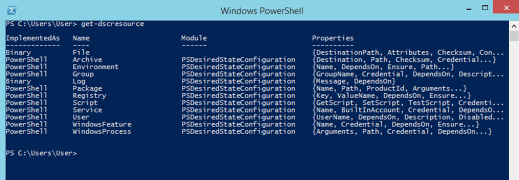
Admins use these resources to configure components, such as registry keys and Windows services, or to create and manage local users through a configuration script. For instance, the File resource manages files and folders, the Environment resource manages environment variables and the Registry resource manages the registry keys of a node. Windows default, or built-in, DSC resources include the following:
- Archive resource.
- Environment resource.
- File resource.
- Group resource.
- GroupSet resource.
- Log resource.
- Package resource.
- ProcessSet resource.
- Registry resource.
- Script resource.
- Service resource.
- ServiceSet resource.
- User resource.
- WindowsFeature resource.
- WindowsFeatureSet resource.
- WindowsOptionalFeature resource.
- WindowsOptionalFeatureSet resource.
- WindowsPackageCabresource resource.
- WindowsProcess resource.
Additional resources are available for cross-node dependency, package management and Linux resources.
PowerShell Integrated Scripting Environment
PowerShell Integrated Scripting Environment (ISE), introduced by Microsoft in PowerShell version 2.0, is a PowerShell host application used to write, test and debug scripts or write commands in a Windows GUI. To access the ISE, click Start, select Windows PowerShell and choose Windows PowerShell ISE. As an alternative, simply type powershell_ise.exe in the command shell or Windows Run box.
PowerShell ISE comes with multiple features, such as language help, syntax coloring, multiline editing, context-sensitive help and tab completion.
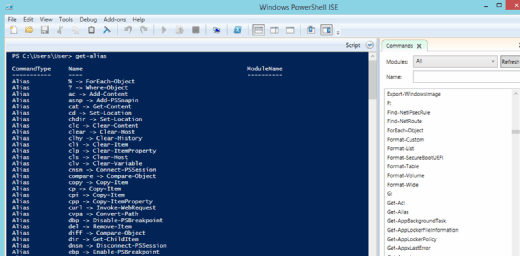
PowerShell ISE has sophisticated features that are familiar to Windows users. For instance, a user can highlight and copy a portion of a PowerShell command with a mouse or with the Shift + Arrow hot-key combination. The user can also paste the content anywhere in the editor window.
Another useful feature is the ability to keep different versions of a command in the editor and run commands you need in the PowerShell ISE.
The F5 key launches a command directly from the editor. To execute a particular line, select it and press F8. The context-sensitive help displays matching cmdlets when the user starts to enter a command. A command add-on shows a list of cmdlets to select.
PowerShell ISE provides tabs to enable work on multiple administrative tasks. PowerShell ISE enables quick switching from the CLI to scripting mode.
PowerShell modules
PowerShell modules enable admins to reuse a script to automate a task. A PowerShell module can be defined as a set of PowerShell elements -- such as cmdlets, providers, functions, workflows, variables and aliases -- that are grouped to manage all the aspects of a particular area. PowerShell modules enable admins to reference, load, persist and share code. The simplest way to create a PowerShell module is to save the script as a PSM1 file.
A PowerShell module contains four essential elements:
- A PSM file, which is the module.
- Help files or scripts needed by the module.
- A manifest file that describes the module.
- A directory that stores the content.
A PowerShell module can be one of four types:
- Script module. A PSM1 file that contains various functions to enable admins to perform import, export and management functions.
- Binary module. A .NET framework assembly (DLL file) that contains compiled code. Developers typically use a binary module to create cmdlets with powerful features not easily done with a PowerShell script.
- Manifest module. A manifest module is a module (PSM1) file with an associated manifest (PSD1 file).
- Dynamic module. A dynamic module is created dynamically on demand by a script. It isn't stored or loaded to persistent storage.
PowerShell cmdlets
A cmdlet is a single basic command used within PowerShell. A cmdlet can be invoked as part of a PowerShell script -- an important element of automation -- or invoked programmatically through PowerShell APIs. A cmdlet typically performs a specific action and then returns a .NET object to PowerShell that can be used by a subsequent command. PowerShell cmdlets are often created -- meaning coded by developers -- to handle specific operations.
There are myriad cmdlets for PowerShell. For example, running the Get-Service cmdlet returns a list of services currently running on the computer.
All cmdlets require an attribute needed to declare the code to be a cmdlet. Cmdlets also possess a variety of parameters, such as required, named, positional and switch parameters. Parameters can be used as a set, and some parameters can also be dynamically added at runtime. PowerShell cmdlets can be created to prompt user feedback before the cmdlet acts, effectively creating interactive cmdlets.
Cmdlets vs. commands
The terms cmdlet and command are sometimes used interchangeably. Commands and cmdlets can both tell PowerShell -- and the computer -- to do something specific. However, cmdlets differ from commands in several ways:
- A command is often a small, standalone executable file, such as the ipconfig command used at the console command line, but cmdlets are instanced .NET classes.
- Cmdlets are typically small and can be created from just several dozen lines of code.
- Commands can often perform parsing, error handling and output formatting. Cmdlets can't, and such functionality is handled by the PowerShell platform.
- Commands generally don't participate in a pipeline because data isn't passed to or used by subsequent commands. Cmdlets are designed to use input objects from the pipeline and then deliver output objects to the pipeline.
- Cmdlets typically process a single object at a time.
PowerShell functions
A PowerShell function is similar to a PowerShell cmdlet, with several slight differences. In simplest terms, a function involves a list of PowerShell statements organized under a single function name or label. The function is invoked by simply typing the function name, and the list of statements is executed as if an administrator typed them at the command prompt. A function can be as simple as one-line command with parameters or as complex as a full cmdlet or application.
Cmdlets are written in a compiled .NET language, such as C#, while functions are written in PowerShell and aren't compiled. For developers and independent software vendors, it's easier to package and deploy a PowerShell cmdlet compared to packaging libraries of functions. Cmdlets and advanced functions support powerful parameter bindings.
As with cmdlets, functions can use parameters and return values that can be passed to other functions or cmdlets. By describing a parameter to the shell, admins can use any type of PowerShell parameters, such as named parameters, mandatory parameters and positional PowerShell parameters.
The following is an example of a PowerShell function.
function Set-Something {
   [CmdletBinding()]
   param (
     [Parameter()]
     [string]$Thing
   )
   Write-Host $Thing
 }
A function contains one or more option parameters inside of a parameter block and a body.
Language constructs
As a scripting language, PowerShell offers several language constructs that control the flow of scripts, while making decisions as to what should be done. Some of the language constructs include conditionals, switches, loops and variables.
Conditionals. The language construct if is used to evaluate a conditional expression. When the conditional expression is true, a script block is executed. If the conditional expression is other than true -- noted as something else -- then alternative commands, functions and cmdlets can be executed.
if ($i -eq 1)
 {
   ## Do something
 }
 else
 {
   ## Do something else
 }
Switch. The switch statement is used when there is a long list of conditional statements to test. Switch is commonly used in place of many if/else constructs.
switch ($i) {
   0
   {
     Write-Host "I is 0"
   }
   1
   {
     Write-Host "I is 1"
   }
   Default
   {
     Write-Host "I is not 0 or 1" >
   }
 }
Loops. Loops provide powerful means of evaluating and repeating complex tasks based on the state of parameters or variables. There are several different types of loops. The while statement repeats code as long as the following conditional expression is true.
while ($i -eq 0) {
   ## Do something >
 }
The do loop is similar to the while loop. The only difference is PowerShell executes the do loop at the end of the loop.
do {
   ## do something
 } while ($i -lt 0)
When you use a foreach loop, PowerShell repeats the code for each item mentioned in the script.
$array = ('item1','item2','item3')
 foreach ($item in $array) {
   $item
 }
Use a for loop to execute statements repeatedly until a condition is met.
for ($i = 0; $i -lt 5; $i++)
 {
   $i
 }
Variables
Variables store data, but PowerShell variables are more powerful because they can be mapped to underlying classes in the .NET framework. PowerShell treats variables as .NET objects, which means they can store data and manipulate data in multiple ways.
Variable names in PowerShell start with a dollar sign and contain a mix of numbers, letters, symbols and spaces. For instance, $var="HELLO" stores the string HELLO in the $var variable. As another example, the previous code instance uses the variable $i to hold the value evaluated within the for loop. Variables can also have different scopes, such as global, local, script, private and numbered scopes.
Arrays
A PowerShell array is a component that enables the storage of more than one item in a variable or a field. For instance, to assign multiple values to a variable, use the script $a=1,2,3.
PowerShell treats each item in an array as a separate element. To address each item in an array, PowerShell offers index numbers. The first element in the array is indexed as 0 by default. The biggest advantage of PowerShell is that it automatically handles array insertions, so arrays don't have to be manually destroyed or created when adding or removing elements.
Hash tables
Hash tables are data structures similar to arrays. A PowerShell array stores multiple single items, but with a hash table each item or value is stored using a key or value pair. An array can't store multiple values under each element, while a hash table can.
Below is an example comparing an array with a hash table.
$array = @('Joe','Susie','Donnie')
 $hashtable = @{FirstName = 'Joe'; FirstName = 'Susie'; FirstName = 'Donnie'}
Help and comments
PowerShell enables the addition of help topics for modules, scripts and individual commands. To view all the help topics, use the Get-Help command.
When importing a module into a session, PowerShell automatically imports the help topics for that module. If there are no help topics for a module, the Get-Help command displays autogenerated help. Three types of help content exist in PowerShell: comment-based help, external help and updatable help.
Comment-based help refers to comments included with a script or command for Get-Help to read. External help enables the author to define help content in an external XML file written in XAML. Updatable help uses external help but enables users to download the latest help content with the Update-Help command.
Executable programs
PowerShell is also a Command Prompt replacement that runs an executable program in multiple ways through the Start-Process command, the ampersand and the Invoke-Expression command. This can be a convenient way for PowerShell to run commands and other executables. Using ping.exe as an example, here's how a user can run an executable program using PowerShell.
Start-Process -FilePath 'ping.exe' -ArgumentList 'google.com' -Wait -NoNewWindow
 & 'ping.exe' google.com
 ping google.com
 Invoke-Expression -Command 'ping.exe google.com'
History of PowerShell
PowerShell was first demonstrated in 2003 and initially released in 2006. Since then, it has significantly expanded through numerous major releases, each still supported and providing backward compatibility with prior versions. The following are some of the major release versions and dates:
- Windows PowerShell 1.0. Released in 2006 for Windows XP SP2, Windows Server 2003 SP1, Windows Vista and Windows Server 2008.
- Windows PowerShell 2.0. Released in 2009 and integrated with Windows 7, Windows Server 2008 R2, Windows XP SP3, Windows Server 2003 SP2 and Windows Vista SP1. The release included Windows PowerShell ISE v2.0.
- Windows PowerShell 3.0. Released in 2012 and integrated with Windows 8 and Windows Server 2012. It was also released for Windows 7 SP1, Windows Server 2008 SP1 and Windows Server 2008 R2 SP1.
- Windows PowerShell 4.0. Released in 2013 and integrated with Windows 8.1 and Windows Server 2012 R2. It was also released for Windows 7 SP1, Windows Server 2008 R2 SP1 and Windows Server 2012.
- Windows PowerShell 5.0. Released and updated to version 5.1 in 2016 to support Windows Server 2016. Version 5.1 was also released in 2017 for Windows 7, Windows Server 2008, Windows Server 2008 R2, Windows Server 2012 and Windows Server 2012 R2.
- PowerShell Core 6. Released in 2018 as the first free and open source iteration of PowerShell for cross-platform deployment on Windows, macOS and Linux platforms. Versions 6.1 and 6.2 subsequently appeared to fix bugs, enhance performance and improve compatibility with existing cmdlets and support Windows 10 and Windows Server 2019.
- PowerShell 7. Released in 2020 and currently serves many Windows versions, including Windows 7 SP1, Windows 8.1, Windows 10, Windows 11, Windows Server 2008 R2 SP1, Windows Server 2012, Windows Server 2012 R2, Windows Server 2019 and Windows Server 2022. Subsequent versions 7.2 -- there was no 7.1 -- and 7.3 address improvements in cross-platform installation and fixes.
How do I start learning PowerShell?
PowerShell is a complex and comprehensive platform that can perform a vast array of functions and support sophisticated enterprise-class tasks -- many of which can be automated through scripts and custom cmdlet creation, or programming. Consequently, most system administrators must eventually be proficient in PowerShell to effectively perform their regular day-to-day duties.
However, there is no single pathway to learning PowerShell. Learning options are available to almost any level of PowerShell user, but the following are some common approaches:
- Tinker. PowerShell is free and already installed on virtually every Windows computer; simply search for and run the PowerShell app. PowerShell enthusiasts can try new commands and experiment with new cmdlets to gain comfort with PowerShell interface and behavioral basics.
- Take self-paced training. Microsoft provides free and extensive learning content for PowerShell, including a self-paced introduction.
- Study Microsoft documentation. Microsoft provides free and comprehensive documentation for all aspects of PowerShell, including commands and cmdlets. Students and professionals alike can refer to documentation to expand their PowerShell knowledge.
- Read books. There are countless books published to bolster PowerShell expertise in varied learning and use case environments. Several recent titles include Learn PowerShell in a Month of Lunches, Fourth Edition (Travis Plunk, James Petty, Tyler Leonhardt: April 26, 2022) and Windows Server Automation with PowerShell Cookbook, Fourth Edition (Thomas Lee, Jeffrey Snover: July 30, 2021).
- Take classes. Finally, PowerShell users can find a wide range of self-study and guided courses focused on various aspects and use cases for PowerShell. As an example, Udemy promotes a range of PowerShell courses, including "Learning Windows PowerShell," "Master Microsoft PowerShell" and "PowerShell for Active Directory Administrators." Local colleges and adult education centers might also offer instructor-led coursework for PowerShell users.
These options are not mutually exclusive. Varied learning options can be used in any combination to accelerate PowerShell adoption and proficiency.
How to launch PowerShell
Any computer running Windows 10 or later already has PowerShell installed by default. PowerShell can be invoked simply by typing "powershell" into the Search bar and selecting the PowerShell app from the resulting search list. Similarly, PowerShell can be invoked by entering powershell.exe in the Run dialog.
PowerShell 7 also supports cross-platform installation on many Linux distributions and can be launched by typing pwsh at the Linux command prompt. The launch process is similar under macOS. Once PowerShell is installed, simply open a Terminal window and type the pwsh command.
How to create and run PowerShell scripts
PowerShell is primarily an execution platform, so developers generally create scripts in a different tool and then run those scripts through PowerShell.
There are countless options for creating a script, including almost any ordinary text editor, the PowerShell ISE, Microsoft Visual Studio Code or even legacy Notepad. Users can embrace almost any editor that meets the organization's development needs. Consider the basic steps to create a simple one-command script using Notepad on Windows 11:
- Search for and select Notepad to launch the application.
- In Notepad, write the command line Write-Host "This is your first script…Great job!"
- Click File and select the Save As option.
- Enter a useful name for the script, such as script.ps1.
- Click the Save button.
Now that the script is created and saved as a PS1 file, be sure to change the execution policy on the system so that scripts will run, as scripts are blocked by default. To change the execution policy on Windows 11, follow these steps:
- Click Start and search for PowerShell.
- Right-click the PowerShell app in the list and select Run as administrator.
- PowerShell starts. Now type the command Set-ExecutionPolicy RemoteSigned.
- This tells PowerShell to change the execution policy. Select the Yes to All option by typing A and pressing Enter.
Finally, the new script can be executed using the & command, the path to the script and the name of the PS1 file created, such as & C:\Users\steve\OneDrive\Documents\script.ps1.
The text created in the example script is written to the host device -- in this case, the monitor.
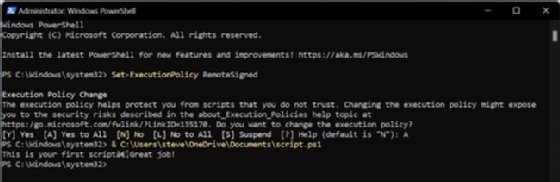
This is just one simple example. PowerShell scripts are typically far more detailed and complex. When creating script files, it's a good idea to provide a well-known folder path for holding script files. It's often a sound practice to include version control or other version management techniques as well, such as adding a version designation to the PS1 file name. For example, rather than simply naming the file script.ps1, it might be more meaningful to name the file script_020123_v1_0.ps1 to indicate that file version 1.0 was created on Feb. 1, 2023.
Future of PowerShell
Even though PowerShell has been consigned to the open source community, Microsoft continues to actively participate and contribute to open source PowerShell development. After two decades, PowerShell has developed a ubiquitous presence and achieved broad -- almost irreplaceable -- adoption in enterprise environments.
Users shouldn't expect groundbreaking new features and functionality, but PowerShell will continue to be updated and maintained to meet the changing capabilities of Windows, Linux and macOS well into the foreseeable future. In addition, there are several developments on the horizon, including better and simplified automation, as well as improved configuration and remote operation.