Windows 10 (Microsoft Windows 10)

What is Windows 10?
Windows 10 is a Microsoft operating system for personal computers, tablets, embedded devices and internet of things devices.
Microsoft released Windows 10 in July 2015 as a follow-up to Windows 8. Windows 10 has an official end of support date of October, 2025, with Windows 11 as it's successor.
Anyone adopting Windows 10 can upgrade legacy machines directly from Windows 7 or Windows 8 to Windows 10 without re-imaging or performing intrusive and time-consuming system wipes and upgrade procedures. To upgrade from a previous version of Windows 10, IT or users run the Windows 10 OS installer, which transfers any applications and software on the previous OS, as well as settings and preferences over to Windows 10.
Organizations and users can pick and choose how they will patch and update Windows 10. IT or users can access a Windows 10 upgrade through the Windows Update Assistant to manually begin an upgrade or wait for Windows Update to offer an upgrade when it is set to run.
Windows 10 features built-in capabilities that allow corporate IT departments to use mobile device management (MDM) software to secure and control devices running the operating system. In addition, organizations can use traditional desktop management software such as Microsoft System Center Configuration Manager.
Windows 10 features
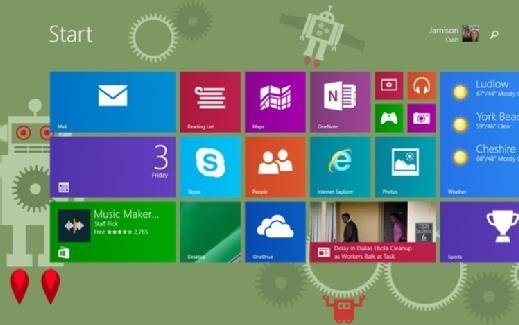
The familiar Start Menu, which Microsoft replaced with Live Tiles in Windows 8, returned in Windows 10. Users can still access Live Tiles and the touch-centric Metro interface from a panel on the right side of the Start Menu, however.
Microsoft Windows 10 Continuum allows users to toggle between touchscreen and keyboard interfaces on devices that offer both. Continuum automatically detects the presence of a keyboard and orients the interface to match.
Windows 10's integrated search feature allows users to search all local locations, as well as the web simultaneously.
Microsoft Edge debuted with Windows 10 and replaces Internet Explorer as the default web browser. Edge includes tools such as Web Notes, which allows users to mark up websites, and Reading View, which allows users to view certain websites without the clutter of ads. The browser integrates directly with Cortana, Microsoft's digital assistant, which is also embedded within Windows 10.
Cortana integrates directly with the Bing search engine and supports both text and voice input. It tracks and analyzes location services, communication history, email and text messages, speech and input personalization, services and applications, and browsing and search history in an effort to customize the OS experience to best suit users' needs. IT professionals can disable Cortana and some of its features with Group Policy settings.
Windows 10 security
Microsoft Windows 10 integrated support for multifactor authentication technologies, such as smartcards and tokens. In addition, Windows Hello brought biometric authentication to Windows 10, allowing users to log in with a fingerprint scan, iris scan or facial recognition technology.
The operating system also includes virtualization-based security tools such as Isolated User Mode, Windows Defender Device Guard and Windows Defender Credential Guard. These Windows 10 features keep data, processes and user credentials isolated in an attempt to limit the damage from any attacks.
Windows 10 also expanded support for BitLocker encryption to protect data in motion between users' devices, storage hardware, emails and cloud services.
Windows 10 system requirements
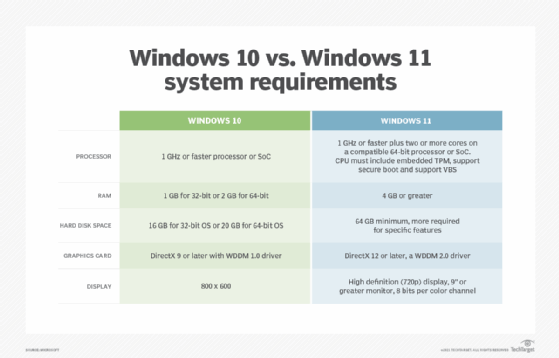
The minimum Windows 10 hardware requirements for a PC or 2-in-1 device are:
Processor: 1 gigahertz (GHz) or faster processor or system-on-a-chip (SoC)
RAM: 1 gigabyte (GB) for 32-bit or 2 GB for 64-bit
Hard disk space: 16 GB for 32-bit OS 20 GB for 64-bit OS
Graphics card: DirectX 9 or later with Windows Display Driver Model 1.0
Display: 800x600
These requirements are not sufficient to run Windows 11 systems.
Windows 10 upgrades
IT professionals and end users have two options to upgrade from Windows 7 or 8.1 to Windows 10. One is by installing and running the Get Windows 10 application. The other is to use an image file with a designated group of settings and applications to upgrade to Windows 10.
When upgrading to Windows 10 from Windows XP, Microsoft only officially supports a clean install where nothing carries over from the previous OS. Application and hardware compatibility could be a problem with XP upgrades because the OS is so old.
Microsoft provides the Assessment and Planning Toolkit to help determine how ready existing systems and versions of Windows are for an upgrade.
Windows 10 updates
There are four licensing structures, called branches, that dictate how and when Windows 10 devices receive updates.
The Insider Preview Branch is limited to members of the Microsoft Insiders Program. With this branch, IT professionals get access to the latest Windows 10 updates before they are made available to the general public, which gives them more time to test out the newest features and evaluate compatibility.
Current Branch, which is designed for consumer devices, delivers updates automatically to any device running Windows 10 that is connected to the internet and has Windows Update on.
Current Branch for Business is an enterprise-focused option that is available for the Professional, Enterprise and Education editions of Windows 10. It gives IT four months to preview the latest update and eight months to apply it. IT must apply the updates within the eight-month timeframe or it loses Microsoft support.
The Long Term Servicing Branch (LTSB), which is geared toward systems that cannot afford downtime for regular updates such as emergency room devices and automatic teller machines, gives IT the most control. With the LTSB, IT receives full OS updates every two to three years. IT can delay the update for up to 10 years. If IT does not update within 10 years it loses Microsoft support.
No matter which update branch an organization uses, security and stability updates, which patch security holes, protect against threats and make sure the OS continues to run smoothly, still come on a monthly basis.
Windows 10 history and reception
Windows 8 offered a new touch-enabled gesture-driven user interface like those on smartphones and tablets, but it did not translate well to traditional desktop and laptop PCs, especially in enterprise settings. In Windows 10, Microsoft tried to address this issue and other criticisms of Windows 8, such as a lack of enterprise-friendly features.
Microsoft announced Windows 10 in September 2014 and the next month made a technical preview of the OS available to a select group of users called Windows Insiders. Microsoft released Windows 10 to the general public in July 2015. Overall, users and IT experts consider Windows 10 to be much more enterprise-friendly than Windows 8 because of its more traditional interface, which echoes the desktop-friendly layout of Windows 7. Improved performance over past versions of Windows, as well as effective search capabilities and the integration of Cortana, also helped the operating system gain support.
The Windows 10 Anniversary Update, which came out in August 2016, made some visual alterations to the task bar and Start Menu. It also introduced browser extensions in Edge and gave users access to Cortana on the lock screen.
In April 2017, Microsoft released the Windows 10 Creators Update, which made Windows Hello's facial recognition technology faster and allowed users to save tabs in Microsoft Edge to view later.
The Windows 10 Fall Creators Update debuted in October 2017, adding Windows Defender Exploit Guard to protect against zero-day attacks. The update also allowed users and IT to put applications running in the background into energy-efficient mode to preserve battery life and improve performance.
In August 2019, rather than staying with the "Tablet Mode" option, Microsoft began experimenting with different virtual keyboard and desktop setups for convertible device user interfaces.
Windows 10 privacy concerns
Microsoft collects a range of data from Windows 10 users, including information on security settings and crashes, as well as contact lists, passwords, user names, IP addresses and website visits.
IT and users can put limits on the data Microsoft collects. There are three settings that determine how much telemetry data Windows 10 sends back to Microsoft: Basic, Full and Enhanced. Enhanced is the default and sends the most data back, but IT or users can easily select one of the other two options. Windows 10 Enterprise and Education users can turn telemetry data off too.
Microsoft does not actually read the contents of users' communications, however, and anonymizes all the data. The company's privacy statement says the purpose of the data collection is to improve performance and provide a positive user experience.
Another way IT professionals and end users can limit data collection is by disabling data sharing through privacy settings. IT can also use Group Policy settings to tighten up what information leaves devices.
Continue Reading About Windows 10 (Microsoft Windows 10)
Dig Deeper on Windows OS and management
-
![]()
Windows 11 upgrade issues that desktop admins should know
By: Brien Posey
-
![]()
Sluggish adoption of Windows 11 with more devices on unsupported OSes
By: Cliff Saran
-
![]()
How does Microsoft 365 extend Windows 7 support?
By: Reda Chouffani
-
![]()
Windows 7: The pieces are coming together for a PC rethink
By: Cliff Saran