Local Group Policy Editor
What is Local Group Policy Editor?
Local Group Policy Editor is a Microsoft Management Console (MMC) snap-in that provides a user interface for managing local Group Policy settings on a Windows computer. The settings are included in the Local Computer Group Policy Object (GPO), a collection of settings that control computer and user configurations on the local system.
Group Policy is a hierarchical infrastructure that enables IT administrators to configure settings on Windows computers. The configurations are controlled through policies that are grouped together logically into GPOs. One of those GPOs is Local Computer, which is defined on each Windows computer whether or not it is part of an Active Directory domain.
Administrators can use the Local Group Policy Editor snap-in to manage the settings in the Local Computer GPO. The GPO contains two categories of settings:
- Computer Configuration. The settings apply to all users who log on to the computer. They include policies related to startup and shutdown scripts, deployed printers, system security and quality of service. This category also contains administrative templates for defining registry settings.
- User Configuration. The settings apply to users, regardless of which computer they sign in to. They include settings specific to Windows and other software. This category also provides administrative templates for defining registry settings.
How does Local Group Policy Editor work?
Figure 1 shows the Local Group Policy Editor snap-in with the Local Computer GPO expanded. The settings are organized into hierarchical groups that can be navigated in the left panel. The User Rights Assignment group is selected (Computer Configuration > Windows Settings > Security Settings > Local Policies > User Rights Assignment). The policies in that group are listed in the right panel.
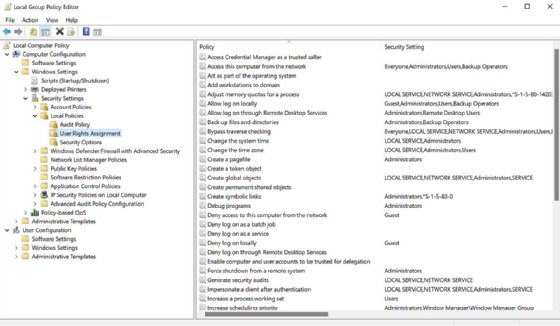
The Local Group Policy Editor snap-in enables administrators to configure a variety of computer and user settings. They can enable auditing, specify which scripts to run at startup or shutdown, define public key policies, set software restrictions, configure Windows public key policies, and update or disable a wide range of other configurations.
Administrators can view and modify policies in the snap-in's right panel. For example, an administrator can update the Allow log on locally policy in the Computer Configuration section by navigating to the User Rights Assignment group and double-clicking the policy in the right panel. This launches the Properties dialog box for that policy, as shown in Figure 2.

In the dialog box, the administrator can add or remove users or groups to control who can log on to the computer. The administrator can also view the Explain tab to learn more about the policy, as shown in Figure 3.

Users need administrative privileges to use the Local Group Policy Editor snap-in. The snap-in is enabled by default in most Windows editions. The only exception is the Windows Home edition. Users can add it to their systems, but it requires them to carry out several steps. For this, they should refer to Windows documentation or other resources.
Administrators have multiple options for starting Local Group Policy Editor, although they might vary from one Windows edition to the next. In Windows 11, for example, an administrator needs only type gpedit in the Windows search box on the taskbar and then press Enter. However, this approach is specific to the default Local Computer GPO. An administrator can also access Local Computer GPOs for other computers or for specific users or groups, but this requires a separate process.
To access different GPOs, the administrator must launch MMC and then add a Group Policy Object Editor snap-in for each computer, group or user that should be included. For example, Figure 4 shows MMC with two Local Computer GPOs: one for the Administrators group and one for the usr1 user account.
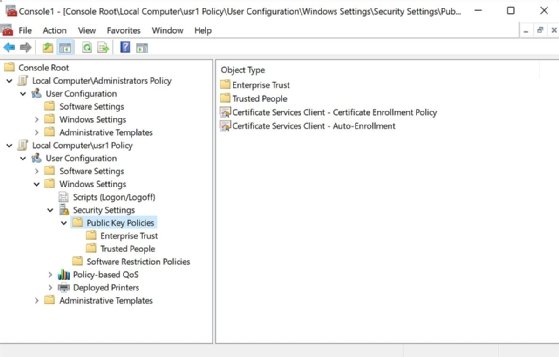
In this case, the Public Key Polices group is selected for the Local Computer\usr1 GPO. The policies in this group are listed in the right panel, along with the group's two subgroups. Both Local Computer GPOs include only the User Configuration settings because the GPOs are specific to user accounts. Whenever an administrator adds a Group Policy Object Editor snap-in to MMC, the settings apply only to the associated computer, user or group.
Check out 12 Windows 10 GPO settings IT must know, and see how to avoid common GPO backup and restore problems.