TCPView

What is TCPView?
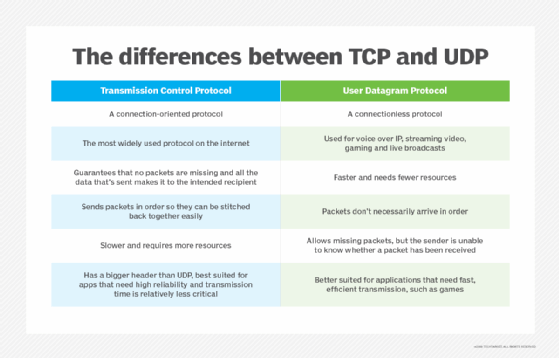
TCPView is a robust Windows network monitoring utility that shows a graphical representation of all current network activity on TCP and User Datagram Protocol (UDP) endpoints on a system. It is an essential monitoring tool for network administrators and IT professionals who monitor network traffic and quickly diagnose network-related problems.
Sysinternals' TCPView was initially released in 2007. TCPView downloads include a command-line version called TCPVCon. Similar information can be found in Windows' native Netstat program, but with a less user-friendly interface.
What is TCPView used for?
TCPView is a Windows-based utility that gives users a real-time view of their network connections. It shows detailed information about TCP and UDP endpoints, including the local and remote IP addresses, the connection state, the process that owns the connection, and the amount of data sent and received.
Microsoft TCPView is key to monitoring network activity, managing connections and diagnosing network-related issues. It allows sorting by process name, local and remote addresses and connection state, such as "Listening" or "Established." In addition to showing existing network connections, TCPView lets users close connections manually or kill processes from within the program.
How to use TCPView
TCPView is a lightweight, standalone application that requires no installation or configuration. Users can download TCPView from the Microsoft website and run it directly from the executable file.
IT administrators can monitor the network activity of the local machine and display the information in a user-friendly interface. All they must do is launch TCPView, and it will immediately start to collect data on active TCP and UDP connections on the machine.
The main TCPView window displays a list of all active connections, each represented by a row in the table. The rows are color coded to indicate the state of the connection -- for example, green for established connections and red for closed connections.
Users can click on a row to view more detailed information about the connection, such as the local and remote IP addresses, the process that owns the connection, and the amount of data sent and received. TCPView also lets users filter and sort the connection list, making it easier to find and manage specific connections.
Is TCPView safe?
TCPView is safe to use if it is downloaded from a reputable source and used for its intended purpose.
How is TCPView different from Netstat?
The key difference between Netstat and TCPView is that Netstat is a command-line program and does not have a graphical user interface (GUI). In contrast, TCPView boasts a GUI that displays network statistics visually.
How to use TCPView to find hackers?
Network administrators can use TCPView to identify suspicious network connections on a computer or the network. For example, TCPView can be particularly useful in determining a hacker's IP address and other essential details that can help users track them down.
To find a hacker, scan through the list of active network connections and identify any suspicious connections. For example, a suspicious connection might be one that is using a lot of bandwidth, one using an unrecognized remote IP address or one that is using an uncommon protocol.
Whenever suspicious activity occurs, use TCPView to identify the hacker's IP address by looking at the "Remote Address" column in the TCPView window. Users can also collect more information by selecting "Properties" and acting on it based on the severity of the threat -- for example, blocking the remote IP address or disconnecting it from the internet.
Can you use TCPView to see MAC addresses?
To view Mandatory Access Control (MAC) addresses on Windows-based computers, users can use the TCPView Address Resolution Protocol command-line utility. It lets admins view the MAC address and the corresponding IP address of devices connected to the local network.
By typing arp -a in the command prompt window, they can view a list of devices connected to an admin's network and their corresponding MAC and IP addresses.
What are the pros and cons of using TCPView?
TCPView has its advantages and disadvantages.
For example, Microsoft TCPView is a free and powerful Netstat alternative. Users can explore detailed information about TCP and UDP endpoints and uncover critical server information. However, TCPView demands extensive technical knowledge and is best suited for network administrators and other IT professionals.
There are plenty of TCPView alternatives. These include Connections Viewer, CurrPorts, NetStat Agent, PortsMonitor, Proc Net Monitor and System Informer.
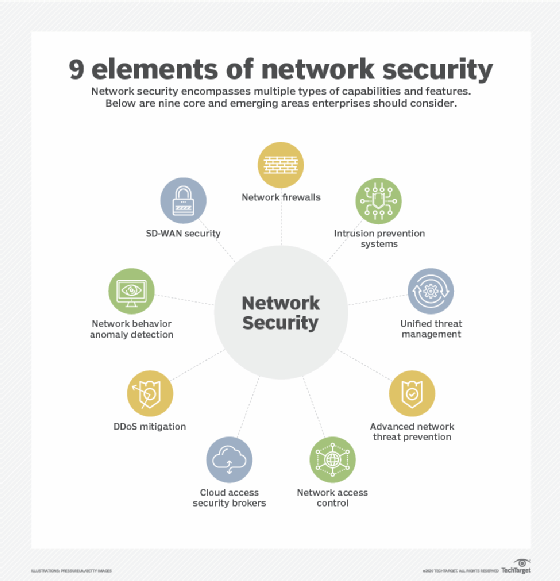
See the top 10 network security best practices to implement today and 4 types of network monitoring.