Forcing the removal of a Windows Server 2008 domain controller
Need solutions for Microsoft Active Directory 2008? This excerpt from "Active Directory Domain Services 2008 How-To" explains how to force the removal of a Windows Server 2008 Domain Controller and how to perform a metadata cleanup.
 |
This chapter excerpt from Active Directory Domain Services 2008 How-To, by John Policelli, is printed with permission from Pearson Publishing, Copyright 2009. Click here to purchase the entire book. |
Scenario/Problem: You are forced into a situation where you cannot gracefully
uninstall Active Directory Domain Services from a DC.
Solution: In Windows Server 2008, you can forcefully remove a DC when it is started in Directory Services Restore Mode. Typically, you force the removal of a DC only if the DC has no connectivity with other DCs.
Because the DC cannot contact other DCs during the operation, the AD DS forest metadata is not automatically updated as it is when a DC is removed normally. Instead, you must manually update the forest metadata after you remove the DC.
To force the removal of a Windows Server 2008 DC, perform the following steps:
- Log on to the server using the Directory Services Restore Mode Administrator account.
- Click Start, click Run, type dcpromo /forceremoval, and press ENTER.
- On the Welcome to the Active Directory Domain Services Installation Wizard page, click Next.
- On the Force the Removal of Active Directory Domain Services page, click Next.
- On the Administrator Password page, type and confirm a password for the local Administrator account; then click Next.
- On the Summary page, click Next.
- Restart the server after the removal is complete.
Performing metadata cleanup
Scenario/Problem: You forced the removal of a DC, but data is lingering in
AD DS. You need to remove this lingering data.
Solution: To remove lingering objects from AD DS after a forceful removal of a DC, you must perform metadata cleanup.
To perform a metadata cleanup, perform the following steps:
- Log on to a writable domain controller.
- Click Start, click Administrative Tools, and click Active Directory Users and Computers.
- In the Active Directory Users and Computers console, select the Domain Controllers Organizational Unit (OU).
- Right-click the domain controller you want to remove from the metadata, and select Delete.
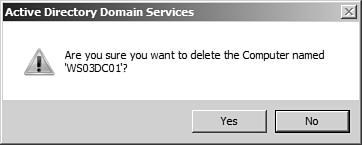
- On the dialog box to confirm the computer object deletion, shown in Figure 3.51, click Yes.
FIGURE 3.51
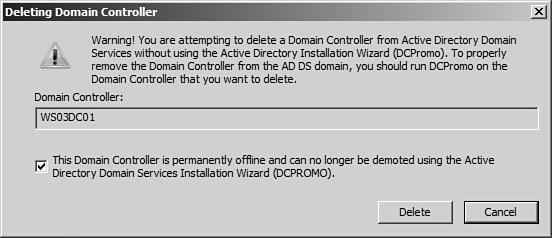
- On the Deleting Domain Controller dialog box, shown in Figure 3.55, select the option This Domain Controller is permanently offline and can no longer be demoted using the Active Directory Domain Services Installation Wizard (DCPROMO). Then click Delete.
FIGURE 3.55 (click to enlarge)
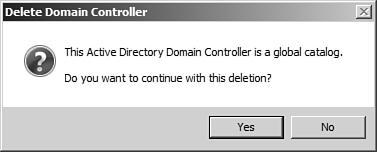
- If the domain controller was also a global catalog server, you receive an additional prompt asking whether you want to continue, as shown in Figure 3.56; click Yes.
FIGURE 3.56
- If the domain controller holds any operations master roles, an additional prompt displays. Click OK to move the roles to the server(s) DCPROMO recommends, or click Cancel and move the roles manually.
- The Active Directory Domain Users and Computers console cleans all metadata for the DC.
ACTIVE DIRECTORY DOMAIN SERVICES 2008 HOW-TO Performing a staged RODC installation Forcing the removal of a DC
| John Policelli has been honored by Microsoft as an MVP for Directory Services. He has provided thought leadership for some of Canada's largest Active Directory installations, and has also served as an author, technical reviewer, and subject matter expert for more than 50 training, exam writing, press, and whitepaper projects related to Windows Server 2008 Identity and Access Management, networking, and collaboration. His technology certifications include MCTS, MCSA, ITSM, iNet+, Network+, and A+. |