Data backup failure: Top 5 causes and tips for prevention
What can you do to prevent data backup failure? Learn how using the 3-2-1 rule, turning to cloud backup and following other practical steps can help protect your data.
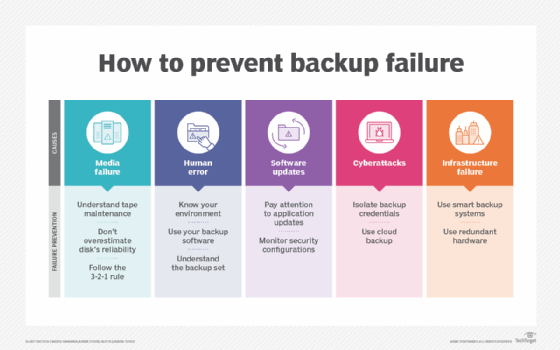
Backups are central to any data protection strategy, and they are critical to any disaster recovery plan. Unfortunately, backup failure is all too common. The inability to restore part, or even all, of an existing backup can cripple a business, ruin its reputation and leave it vulnerable to regulatory violations. When you look at the reasons for failure, the same issues come up again and again.
Keep your organization's data safe by learning five common causes of backup failure and what steps you can take to prevent them.
1. Media failure
Most of today's backups go straight to some type of disk media. As a result, IT encounters fewer media failures than when tapes were the prevalent backup medium. However, media failure still ranks among the top reasons backups and restores fail.
How to prevent media failure
There are three proactive steps you should take to make sure media failure isn't an issue you face:
- Understand tape maintenance. If your organization is still using tape, be sure to pay particular attention to the vendor's directions around the handling, storage and regular replacement of tapes, as well as cleaning the tape drives according to the manufacturer's schedule.
- Don't overestimate disk's reliability. It's unwise to assume that disks won't have failures. Although the incidence of media-related failures is considerably lower with disk than with tape, failures still occur. Disk storage can be on premises, off-site or in the cloud. Regardless, learn what kinds of disks are being used for storage, whether storage is part of a RAID or other redundant array and whether there are other "anti-failure" features, such as redundant power supplies, in play.
- Follow the 3-2-1 rule. Ensure backups use more than one medium, as redundancy is an important part of the 3-2-1 backup strategy.
2. Human error
Software, applications and systems are all consistent in their processing. On the other hand, people can be inconsistent, unpredictable and prone to error. For example, deciding to store tapes somewhere other than in a recommended environment can be the root cause of media failure. Similarly, using overworked or low-quality disk storage as backup targets can leave backups incomplete and unreliable.
People are also responsible for defining the backups -- a common step where mistakes are made. Backups are only as valuable as the data that reside on them. If you don't select a complete data set or workload, the backup won't exist in the time of need. To that point, multi-tier, multiserver applications -- along with applications that have dependencies on other servers, systems and applications -- all need to be a part of a defined backup set. If all you're backing up is one server, you might be only backing up a part of the bigger picture. For example, a key enterprise application might depend on an SQL database operating elsewhere in the enterprise. If the backup only protects the application, but not the SQL application and its database, the backup might be worthless.
This article is part of
What is cloud backup and how does it work?
Third, simply defining a backup is no guarantee that the desired backup is completed successfully. Part of human error is the assumption that a backup cycle ensures a suitable backup product. It doesn't. Regardless of the backup media or target, a key aspect of any backup is proper validation and restoration testing. Validation ensures that all intended backup content was backed up successfully as expected. Testing ensures that the backup can be restored successfully. Restoration also provides regular practice for human training and emergency response confidence.
How to prevent human error
There are four recommendations in particular that can help prevent human failures:
- Know your data set and data environment. Understand what's necessary to consider a backup complete and make certain your backups contain everything necessary for a successful recovery. This includes every data set, application, system, service and dependency related to making the backup set you're focused on viable upon restore.
- Use your backup software. Today's backup systems are designed to intelligently select all the systems, services and data sets necessary. For example, choose "exchange" and the backup should include all that makes up your on-premises Microsoft Exchange environment -- such as the Exchange Server and databases.
- Understand the backup set. Going back to "know your environment," be certain that any part of the environment that your backup software doesn't include is backed up. Sticking with the on-premises Exchange example, you might need to back up Active Directory, a certificate server of some kind, a third-party security application that scans inbound and outbound email messages, and so on. In essence, more than just the technical definition of a backup set -- i.e., which backup systems to include -- might be needed when the time comes to recover.
- Implement testing. Backups are useless if they're damaged or nobody knows how to restore them properly. Use validation to verify that backup files are complete and intact. Use periodic testing to practice and train administrators on proper restoration processes.
3. Software updates
Operating systems and enterprise applications are designed for specific processes and are not necessarily great at working with backups. Some method of connecting to an application's data always exists -- for example, simply through a defined data set or via an API. But sometimes backup failures can be caused by incompatibilities between the backup software and new versions of applications, OS or application updates, new security policies or other technology elements.
How to prevent software issues
The bad news is you can't always know when an update will affect backups, but the good news is that you do control when updates and changes occur. Indeed, awareness is key in avoiding software-induced failures. Here are some specific tips:
- Pay attention to application updates. Most application updates don't affect backups, but the potential is there and it's important to watch out for issues. Software updates typically involve testing and validation to ensure that an update continues to function properly for the enterprise. This concept should be extended to include testing and validation of backup cycles.
- Check dependencies. Modern applications are often highly integrated, so a change to one application might demand a change or update to one or more dependencies. Understand the changes that an update makes, and address updates or changes to any dependencies to ensure that the entire application chain continues to function as expected.
- Monitor security configurations. Modern backup systems are relatively simple to set up. As long as you can connect to the data, application or system in question, the system is going to make a backup copy. However, updates to security settings and policies can impact your backup system's ability to connect and, therefore, to back up. In particular, be certain to stay abreast of any security updates that can affect your backups.
4. Cyber attacks
Backups have long been a critical component in dealing with cyber attacks. But in recent years, cybercriminals have figured out ways to locate and destroy backups. By matching a number of backup file types, backups are located and deleted as part of ransomware attacks, a category of cyber attacks that's on the rise.
Additionally, attackers are finding ways to use a mix of compromised credentials and backup system APIs to delete backups from within a backup system itself. The end result: The backup you thought you had is gone.
How to prevent cyber attacks
By understanding the methods used by hackers to search for and destroy your backups, you can take steps to avoid this failure:
- Isolate backup credentials. Only properly authorized personnel should have access or control over the backup process. This is more a security play, but it's necessary to limit which accounts have the ability to manage the backup system application or access on-premises backup data sets. You should also limit who has access to these accounts.
- Use cloud backup. The most common method bad guys use to find and delete backups is a simple file type search. Having copies of your backups in the cloud -- via your backup application and via not file or VM replication -- maintains a copy of backups out of reach of those intent on destroying them.
5. Infrastructure failure
Every part of your infrastructure responsible for backups can fail. This includes tape drives, libraries, disk arrays, backup servers and the network. And, for those relying on cloud backups, having a high-performing, low-latency network connection is critical to the success of backups.
How to prevent infrastructure failure
Here are three tips to minimize the chances that your infrastructure will fail:
- Use smart backup systems. Backup systems that push data to the cloud are used to connectivity issues and can resume interrupted backup jobs.
- Use redundant hardware. Backups might not be important the day they're created, but they become critical when disaster strikes. Therefore, be sure to have redundancy within the contextual pathway between your environment and the backed-up data set. The options for redundancy are many and include the backup server, networking and on-premises backup storage. Any element that can make backups more likely to succeed is something you should consider.
- Include monitoring. Infrastructure monitoring tools are commonplace in enterprise data centers and should certainly cover the infrastructure used for backups. Any problems or issues can be reported and addressed quickly to avoid problems before they impact backup cycles.
Preventing backup failure
Backups are just like any other part of the IT environment: They can work flawlessly, or they can be a major pain point. Placing an elevated level of importance on ensuring failure doesn't happen is critical to resuming operations when the business faces a loss of data, system, application or location. Using the tips mentioned in this article, you'll have more confidence in your ability to both back up and recover from backup failure.