How to properly authenticate a Linux client in a Windows domain
MVP Gary Olsen describes the step-by-step process of configuring a Red Hat Fedora client into a Windows Server 2003 domain.

Linux servers and clients are becoming popular components in Windows domains. Unfortunately, Windows administrators are generally not used to dealing with interoperability issues caused by having multiple operating systems in the domain. It is important that administrators bite the bullet and understand how to deal with these intruders in their domains, not only for the sake of their infrastructure, but possibly for their careers as well.
To help, we will take a step-by-step look at the process of configuring a Red Hat Fedora client into a Windows Server 2003 domain. This procedure can be fairly straightforward using a Linux utility called authconfig (which is GUI-based to make Windows folks feel at home).
It is advantageous for Linux clients to join a Windows domain so they can access resources. Using the winbindd daemon, pam_winbind and libnss_winbindd modules, Active Directory user accounts are also recognized by Linux, allowing them to telnet and FTP to the Linux system without having to map AD accounts to Linux accounts.
Before we begin the steps, here are a few important things to keep in mind:
- This procedure uses a "terminal window" (like a command prompt in Windows). In the Fedora client, this should appear as an icon on the desktop.
- The command ifconfig dumps network information similar to ipconfig in Windows.
- If you use a VMware workstation and install the Fedora client as a guest OS, the mouse becomes painfully erratic. I personally have tried to install VMware tools and have had the same poor luck. The new VMware Workstation 6.0, we're all hoping, will have better results. But until then, use the keyboard to move between fields in the GUI.
- Using the Tab key to move between fields and the Enter key to select buttons in the authconfig program is much easier than using the mouse.
- Sometimes you'll have two pointers -- a white one and a blue one. Just remember that the blue one is the real one (sometimes you have to work to get them together).
With those points in mind, we can move on to the steps. The procedure here was done in a lab environment on a machine running VMware Workstation v5.5. We have a Windows 2003 domain called ABC.com with a domain controller called ABC-DC1. We have also installed a Red Hat Fedora client called RED-1.
The following steps describe the process of joining the Fedora client to the ABC.com domain.
Note: This assumes that the networking is configured so the client and DC are on the same network.
Step 1
Log in to the Fedora client as root. On the desktop you will see an icon called Terminal. Double-click it to get a command window. From command (#) prompt, enter authconfig (this is a wizard-like program that will lead you through the configuration).
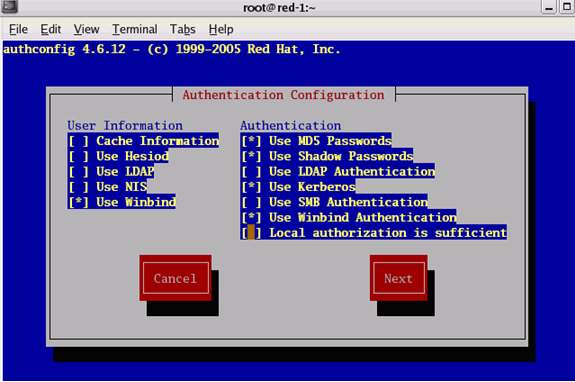
The first screen you see is Authentication Configuration, shown in Figure 1. Use the Tab key to move between fields on the screen and the space bar to select options. An asterisk (*) in the option indicates an option is selected. In the first screen, under User Information, select 'Use Winbind'. Under Authentication, select 'Use MD5 Passwords', 'Use Shadow Passwords' and 'Use Winbind Authentication' (although these will probably already be selected). Tab to the Next button and hit Enter to select it.
Figure 1
Step 2
In the Kerberos Settings screen, make sure the two DNS options at the bottom of the screen are selected. These options are:
- Use DNS to resolve hosts to realms.
- Use DNS to locate KDCs for realms.
Use the Tab key to go to the Next button and hit the Enter key.
Step 3
In the Winbind Settings screen, make sure the security model is ADS and the shell is /bin/bash. Make sure the 'Domain', 'Domain Controllers' and 'ADS Realm' are correct.
Note: The Security Model option of Domain is used for NT domains. ADS is used for Windows 2000 and 2003. The Template Shell of /bin/bash is the shell for Windows.
Now click on the Join Domain button to have authconfig run the net ads join command in the background.
Note: A bug in this version of Fedora will cause a "glibc" abort and return you to the command screen. However, "net ads join" has already completed before this abort occurs.
Click on OK.
When prompted to save changes, select Yes.
Step 4
Now we want to run the wbinfo command to list users in the windows domain. (Although authconfig should start winbindd to make this command work, it won't work until you close authconfig and start winbindd from the command line).
Do the following:
- Close authconfig if it is open. At the command prompt, enter wbinfo –u. You will get an error finding users. This shows that winbind is not started.
- At the command prompt, enter Winbindd.
- Now enter wbinfo –u. This time, you will get results of the command, listing Windows users.
Step 5
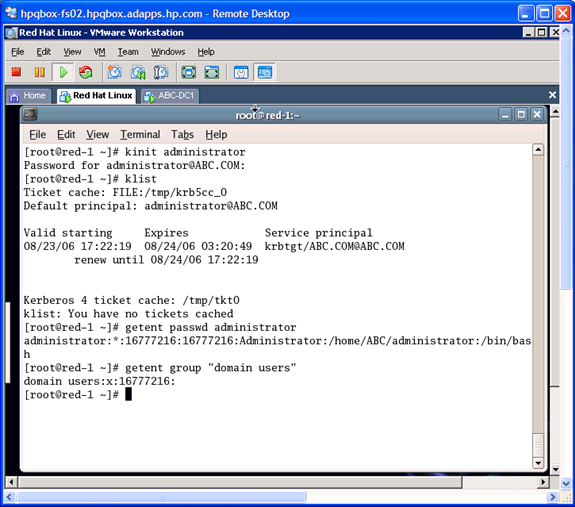
It is important to verify that authconfig has done its job by testing the Kerberos setup with kinit and klist and verifying you can look up Active Directory group information with getent, as shown in Figure 2.
Figure 2
Step 6
Now we can set up home directories for the users. To do this we need to edit three files on the Red Hat client using the (ugh!) VI Editor. But have no fear -- the sidebar to the right has a few tips in it to help you through this.
First, you will need to add this line:
session required pam_mkhomedir.so skel=/etc/skel mask=0077
at the very end of these files:
/etc/pam.d/gdm
/etc/pam.d/sshd
That is, the inserted line will now be the last line in each file.
Now add that same line so that it is the next to the last line of this file:
/etc/pam.d/login
Again, the text to enter is:
session required pam_mkhomedir.so skel=/etc/skel mask=0077
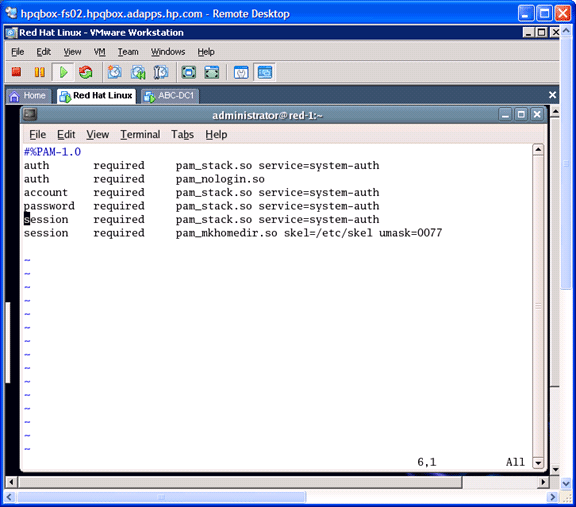
Figure 3 shows an example of editing the sshd file:
Figure 3
Typically, you want users' home directories in a common place. In this example, we named it for the Windows domain. This is a typical configuration for Windows domains. Use this procedure to create the following directory, with Linux permissions 755:
/home/<DOMAINNAME IN CAPS>
For the Active Directory domain 'abc.net', enter the following:
mkdir /home/ABC
chmod 755 /home/ABC
Step 7
Of course, the whole goal of this process is to successfully authenticate to a Windows domain account. To check this, use the Administrator account and enter this command:
# ssh red-1 –l ABC\\administrator
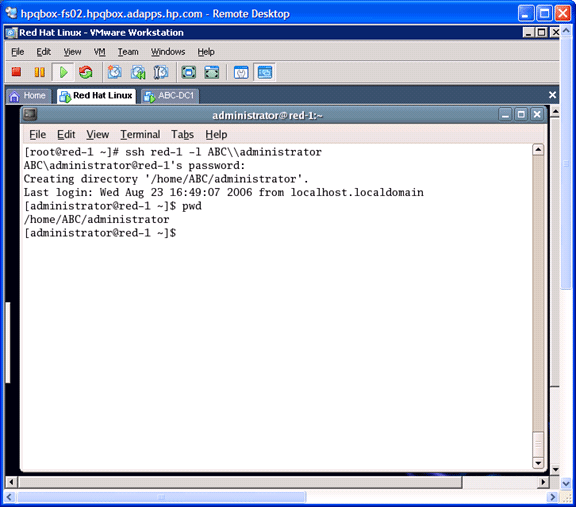
It should be successful in authenticating to the administrator account. Notice that the first time you log in, it creates the /home/ABC/administrator directory for you (as shown in Figure 4).
Figure 4
Note that we had to qualify our login name with the NetBIOS Name or Short Domain Name\\ username. If you would like to leave off the Short Domain Name\\ qualifier, then change the /etc/samba/smb.conf parameter:
'winbind use default domain = yes'
Then you can simply log in as:
ssh red-1 –l administrator
Now, execute the Klist command as we did previously from the command prompt to verify that Kerberos tickets were granted. Next, go to ABC-DC1 and open the ADUC snap-in. Look in the Computers container and verify that there is a computer object for Red-1.
Then, on ABC-DC1, open the event viewer and look at the security log. You should be able to find the event for the Red-1 logon (Event 540), Event 648 regarding the admin using the Microsoft authorization package, and Event 576 where it assigns privileges to the admin session.
For more information, I recommend checking out WinLinAnswers.com, an excellent Web site that is devoted to Windows and Linux interoperability.
How to use the VI Editor
Here is how to modify the /etc/pam.d/gdm file. Use this method to modify /etc/pam.d/sshd also.
- Open the file:
# vi /etc/pam.d/gdm - Enter G to go to the last line (the arrow keys will also move the cursor up and down in the file).
- Hit the Enter key to start a new line.
- Enter i to get to insert mode. Enter the line:
session required pam_mkhomedir.so skel=/etc/skel umask=0077 - Enter ESC (the cursor will go to the bottom of the screen).
- Enter WQ (write/quit) to save the file.
- If you make a mistake and want to start over, enter Q rather than WQ to quit without saving.
Do you have an Active Directory issue or problem that you'd like Gary to write an article about? Email him at [email protected]. Note: Gary cannot answer each query personally or guarantee that all will be answered. However those queries that have widespread interest or involve common AD issues will be addressed.
 Gary Olsen is a systems software engineer for Hewlett-Packard in Global Solutions Engineering. He authored Windows 2000: Active Directory Design and Deployment and co-authored Windows Server 2003 on HP ProLiant Servers. Gary is a Microsoft MVP for Directory Services and formerly for Windows File Systems.