How the DC locator works in Active Directory
The DC locator depends heavily on DNS to not only locate a domain controller with the right role but also to locate one that will be efficient.

In Active Directory, the key to authentication, data access and most applications is for a client to contact a domain controller or global catalog server.
The process that a client uses to contact a domain controller is called the "DC locator." It is implemented as a remote procedure call to the Netlogon service on the local machine. The DC locator depends heavily on DNS to not only locate a domain controller with the right role such as GC or PDC but also to locate one that will be efficient.
The key element of the DC locator is the Netlogon service that runs on each computer. The Netlogon service:
- runs on each workstation, server, DC and DNS server in the domain.
- is responsible for registering each computer's DNS records.
- DCs register _LDAP and _Kerberos SRV records in various places in the DNS zone hierarchy to identify roles such as Global Catalog, PDC and Domain Controller as well as the site they are associated with.
- DCs also register CName (alias) records that map Server GUID to the fully qualified domain name, or FQDN, for replication.
- DNS servers will register SOA and Name Server records.
- All computers will record host (A) records.
- knows specific information about each computer including the computer name, IP address, the AD site it is in and the name of the domain it is a member of.
Upon a client request for a DC for an operation such as authentication, the client passes information about the client -- such as the IP address, domain and the Active Directory site to which it belongs -- to the Netlogon service via the DsGetDcName call. DsGetDcName then issues a DNSQuery to find a DNS server. The DNS server creates a list of SRV records for DCs that will satisfy the request.
In a domain with multiple domain controllers and sites, it is important for clients to use a local DC in their site if possible. Client "site awareness" is a process that allows a client to identify a DC in the client's site for efficiency. This is accomplished by the DNS server returning a list of DCs in the client's domain, with those in the client's site at the top of the list. If there are no DCs available from that site, a DC in another site will be returned.
Figure 1: 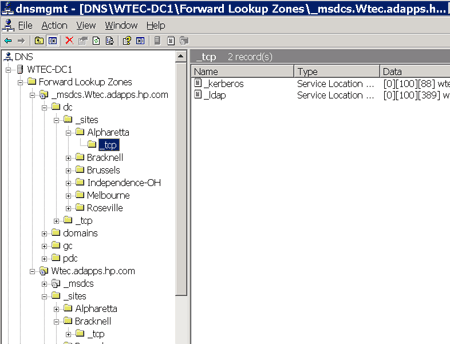
Figure 1 shows how the DNS SRV records are organized, placing records by site. This allows the records to be distributed by site. The site can also be seen in the SRV record _ldap._tcp.SiteName._sites.dc._msdcs.DnsDomainName. If there are no DCs in the client's site, an LDAP record returned would look like this: _Ldap._TCP.dc._msdcs.DnsDomainName.
Client site awareness ultimately depends on the administrator mapping sites to subnets using the Sites and Services snap-in. If this is not done -- or not done correctly -- it can cause clients to go to remote sites for authentication or LDAP queries and so on.
Event 5778 (Warning) indicates that there are events logged, indicating that a client in a certain subnet could not determine the site. The subnet is identified, so fixing this is relatively easy. Remember that in the DC locator, this is handled by the SRV records for a DC to be ordered randomly without preference to site. This will cause the client to use a random DC. With the client authenticating to a DC out of site -- such as a client in Chicago finding a DC in Singapore -- user logon and other actions will suffer and probably cause user complaints.
There are applications that take advantage of site awareness, including the Distributed File System. If you use application partitions, they can take advantage of site awareness to locate DCs hosting the application partition as well.
The DC locator works hand in hand with DNS -- yet another example of the importance of DNS to Active Directory services.
Take a look at the article on the Microsoft Help and Support site called How Domain Controllers Are Located in Windows XP. This is a good description of the DC locator process.
Also check out Microsoft's TechNet site for DNS technical resources. This site contains loads of white papers, step-by-step guides, references to the DNS newsgroup, FAQs and troubleshooting help.
More Information
- Windows Server 8 data deduplication delivers efficient storage
Gary Olsen is a systems software engineer for Hewlett-Packard in Global Solutions Engineering. He authored Windows 2000: Active Directory Design and Deployment and co-authored Windows Server 2003 on HP ProLiant Servers. Olsen is a Microsoft MVP for Directory Services and formerly for Windows File Systems.