NTFS (NT File System)

What is NTFS?
NTFS, which stands for NT file system and the New Technology File System, is the file system that the Windows NT operating system (OS) uses for storing and retrieving files on hard disk drives (HDDs) and solid-state drives (SSDs). NTFS is the Windows NT equivalent of the Windows 95 file allocation table (FAT) and the OS/2 High Performance File System (HPFS). However, NTFS offers several improvements over FAT and HPFS in terms of performance, extendibility and security.
A computer's OS creates and maintains the file system on a storage drive or device. The file system essentially organizes the data into files. It controls how data files are named, stored, retrieved and updated and what other information can be associated with the files -- for example, data on file ownership and user permissions.
NTFS is one type of file system. File systems are generally differentiated by the OS and the type of drive they are being used with. Today, there is also a distributed file system (DFS) where files are stored across multiple servers but is accessed and handled as if it were stored locally. A DFS enables multiple users to easily share data and files on a network and provides redundancy.
How is NTFS used?
Microsoft Windows and some removable storage devices use NTFS to organize, name and store files. NTFS is an option for formatting SSDs -- where its speed is particularly useful -- HDDs, USBs and micro SD cards that are used with Windows.
Depending on the storage capacity of the device, the OS used and the type of drive, a different file system may be preferable, such as FAT32 or Extended FAT (exFAT). Each file system has benefits and drawbacks. For example, security and permissions are more advanced with NTFS than exFAT and FAT32. On the other hand, FAT32 and exFAT work better with non-Windows OSes, such as Mac and Linux.
All Microsoft OSes from Windows XP on use NTFS version 3.1 as their main file system. NTFS is also used on external drives because it has the capacity those drives need, supporting large files and partition sizes. NTFS can support up to 8 petabyte volumes and files on Windows Server 2019 and Windows 10, according to Microsoft. The theoretical limit for the individual file size NTFS can support is 16 exbibytes minus 1 kilobyte (KB).
How NTFS works
When installing an OS, the user chooses a file system. When formatting an SSD or an HDD, users choose the file system they'll use. The process of formatting each type of drive is slightly different, but both are compatible with NTFS.
When an HDD is formatted or initialized, it is divided into partitions. Partitions are the major divisions of the hard drive's physical space. Within each partition, the OS keeps track of all the files it stores. Each file is stored on the HDD in one or more clusters or disk spaces of a predefined uniform size.
Using NTFS, the sizes of the clusters range from 512 bytes to 64 KB. Windows NT provides a recommended default cluster size for each drive size. For example, a 4 gigabyte (GB) drive has a default cluster size of 4 KB. The clusters are indivisible, so even the smallest file takes up one cluster, and a 4.1 KB file takes up two clusters, or 8 KB, on a 4 KB cluster system.
Cluster sizes are determined based on balancing a tradeoff between maximizing use of disk space and minimizing the number of disk accesses required to get a file. With NTFS, generally, the larger the drive, the larger the default cluster size, because it's assumed that a system user will prefer to have fewer disk accesses and better performance at the expense of less efficient use of space.
When a file is created using NTFS, a record about the file is created in the Master File Table (MFT). The record is used to locate a file's possibly scattered clusters. NTFS looks for a storage space that will hold all the clusters of the file, but it isn't always able to find one space all together.
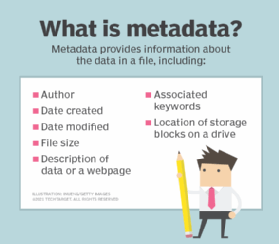
Along with its data content, each file contains its metadata, which is a description of its attributes.
NTFS features
One distinguishing characteristic of NTFS, compared with FAT, is that it allows for file permissions and encryption. Notable features of NTFS include the following:
- Organizational efficiency. NTFS uses a b-tree directory scheme to keep track of file clusters. This is significant because it allows for efficient sorting and organization of files.
- Accessible data. It stores data about a file's clusters and other data in the MFT, not just in an overall governing table as with FAT.
- File size. NTFS supports very large files.
- User permissions. It has an access control list that lets a server administrator control who can access specific files.
- Compression. Integrated file compression shrinks file sizes and provides more storage space.
- Unicode file naming. Because it supports file names based on Unicode, NTFS has a more natural file-naming convention and allows for longer file names with a wider array of characters. Non-Unicode naming conventions sometimes require translation.
- Secure. NTFS provides security for data on removable and nonremovable disks.
- Requires less storage. It has support for sparse files that replaces empty information -- long strings of zeros -- with metadata that takes up a smaller volume of storage space.
- Easy volume access. NTFS uses mounted volumes, meaning disk volumes can be accessed as normal folders in the file system.
Advantages and disadvantages of NTFS
There are several advantages and disadvantages to using NTFS, which are included below.
Advantages
- Control. One of the primary features of NTFS is the use of disk quotas, which gives organizations more control over storage space. Administrators can use disk quotas to limit the amount of storage space a given user can access.
- Performance. NTFS uses file compression, which shrinks file sizes, increasing file transfer speeds and giving businesses more storage space to work with. It also supports very large files.
- Security. The access control features of NTFS let administrators place permissions on sensitive data, restricting access to certain users. It also supports encryption.
- Easy logging. The MFT logs and audits files on the drive, so administrators can track files that have been deleted, added or changed in any way. NTFS is a journaling file system, meaning it logs transactions in a file system journal.
- Reliability. Data and files can be quickly restored in the event of a system failure or error, because NTFS maintains the consistency of the file system. It is a fault tolerant system and has an MFT mirror file that the system can reference if the first MFT gets corrupted.
Disadvantages
- Limited OS compatibility. The main disadvantage of NTFS is limited OS compatibility; it is read-only with non-Windows OSes.
- Limited device support. Many removable devices don't support NTFS, including Android smartphones, DVD players and digital cameras. Some other devices don't support it either, such as media players, smart TVs and printers.
- Mac OS X support. OS X devices have limited compatibility with NTFS drives; they can read them but not write to them.
How NTFS, FAT32 and exFAT differ
Microsoft developed FAT32 before NTFS, making it the oldest of the three file systems. It is generally considered less efficient than NTFS. It has a smaller 4 GB file size and 32 GB volumes in Windows.
FAT32 is easier to format than NTFS and simpler in other ways. Its file allocation table is a less complex way to organize files than the MFT in NTFS. Because it's simpler to use, FAT 32 is more compatible with non-Windows OSes and is used where NTFS generally isn't, such as smart TVs, digital cameras and other digital devices. FAT32 works with every version of Mac, Linux and Windows. As mentioned earlier, NTFS is read-only with Mac and Linux.
ExFAT was designed as an evolution of FAT32 and is the newest of the three file systems. It retains the positive characteristics of FAT32 -- a lightweight, more flexible file allocation system -- while overcoming some of its limitations. For example, FAT32 can only store files of up to 4 GB, while exFAT can handle file sizes of 16 exabytes.
ExFAT does require additional software to work with Mac and Linux systems, but it is more compatible with them than NTFS. It is ideal for when users need a larger file size than FAT32 but has more compatibility than NTFS.
The journaling file system in NTFS makes it possible to use the journal to repair data corruption, something FAT cannot do. The MFT in NTFS holds more information about the files being held than FAT's file allocation tables, making for better file indexing and cluster organization.
The file system takeaway
NTFS, FAT32 and exFAT each have strengths and weaknesses. However, they are also each used in a variety of computing contexts, from personal computing to the enterprise. NTFS is prominent among the three because of its connection to Windows.
Learn more about the differences between these three well-established file systems and how they are used in the enterprise today.